Phases
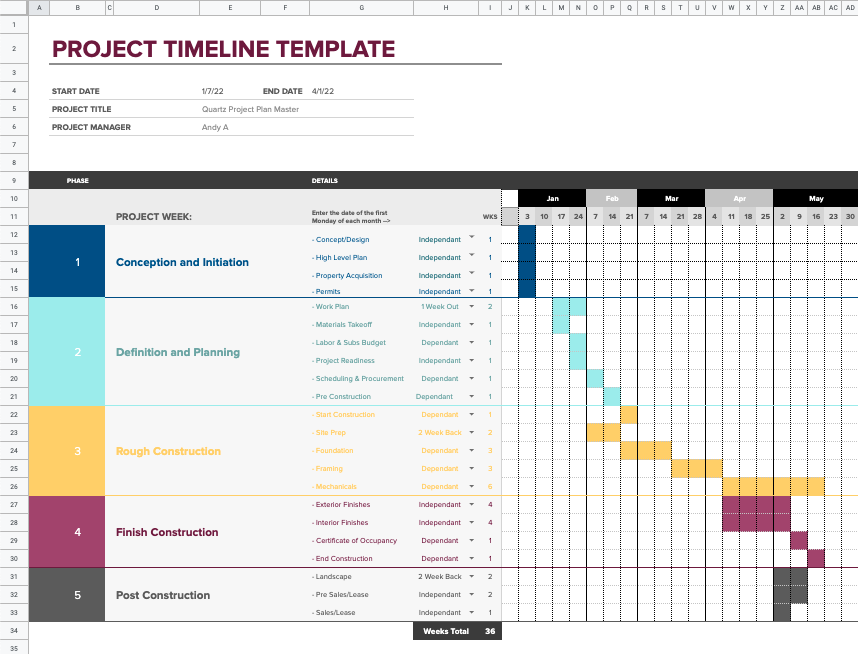
The Phases sheet of Construction Planner provides a way to do high-level planning for a project before getting into the details. This is a usefull tool during project conceptualizing and early planning.
Create the Timeline
Based on your projects Start and Endates, Phase Planner will build a month\week timeline. To do this, go to Extensions/Consutruction Planner/Phase Planner/Build Timeline menu. Once you confirm, the new timeline will be built.
Please note that you can do this again anytime the project dates are changed for whatever reason.
Define Setions
Begin by modifying the default sections to your needs by placing your cursor in an existing section and using the Extensions/Consutruction Planner/Phase Planner/Add Phase Section menu; this will insert a new section after the currently selected section. You can use standard sheets functionality to change section colors.
Define Section Details
Next modify and\or add new section detail rows as needed. To add new section detail rows place your cursor on a section detail cell and use the Extensions/Consutruction Planner/Phase Planner/Add Section Row menu. This will insert a new section row after the currently selected cell. Select desired values under the DEPENDENCIES column and enter number of weeks for the detail row. This information is used by the Phase PLanner functionality to draw your high-level Gantt chart.
Draw Gant Chart
Once you are complete with your phase plan, go to Extensions/Consutruction Planner/Phase Planner/Draw Gantt Chart menu to build out the full Gantt. Repeat this anytme you make changes to the Phase plan.