Overview
Construction Planner is a Google Workspace Add-On designed specifically for use by residential or light commercial builders. With this add-on and the app templates, you will be able to manage all aspects of construction projects, from managing phases, budgets, and timelines to material and price lists for takeoffs.
As you probably know by now most nice construction management software tools are very expensive, and managing projects from spreadsheets is time consuming and mistake prone. Construction Planner is the best of both worlds, providing rich functionality in the simplicity of a spreadsheet.
Although Construction Planner is built primarily in Google Sheets, it’s extensively enhanced with custom menus that provide time saving automations, and custom Gmail and Drive functionality.
Key Features
Project Management
One place for managing all aspects of your construction projects. Keep to do and risk lists, and keep informative journal entries. Vendor and subcontractor contact info is automatically imported into project templates. Keep multiple lists and link them to individual projects.
Project Phase Planning
During early planning and development, create high-level phase plan that informs key stages, rough timeline, and number of weeks to complete the project.
Project Schedule
Develop a construction plan by creating a work breakdown structure(WBS) with sections dates, dependencies, and built in Gantt chart functionality.
Tracking & Budget
From the construction plan WBS, expand into more detailed planning where you can assign subs and owners to tasks, add descriptions and cost information. Use this as your task tracking tool setting status, notes, and percents complete. Build budgets with the addition of task level labor costs and fixed fees.
Materials Takeoff
Build material takeoffs at whatever level of detail you choose. Relate material items to items defined in tracking & budget. Set the class of materials, price, source, pay method, and purchasing status. Set budgets and track actual spend.
Price List Management
Use the materials list template to build extensive and cost accurate lists which are automatically imported for reference in the takeoffs. Keep multiple lists and link them to individual projects.
Door & Window Schedules
Build door and window schedules that can be copied into plans or used in the project plan for reference.
Reports
Builtin reports with your logo, budget summary, labor & material costs reports.
Email to Project
From Gmail, relate individual emails to projects and automatically store copies of emails and attachments in a project specific folder on Google Drive.
Built in Documntation
Access documentation right from the Google Workspace toolbar in Sheets.
Getting Started
Construction Planner interacts with Sheets, Drive, and Gmail as part of a complete package. Before you can start, there are several templates that you will need to copy to your Google Drive.
Vendor & Sub Template 1
This template is from where the Construction planner will pull vendor and subcontractor information for use in tracking and planning, and takeoffs.
Materials List Template 1
This is the materials list template containing material and pricing information used during building takeoffs.
Construction Planner Template 1
At the heart of this tool is the Construction Planner template, which contains the following core sheets.
- Project
- Phases
- Construction Plan
- Tracking & Budget
- Takeoff
- Budget Summary Report
- Labor Cost Report
- Materials Cost Report
Enable Add-On Use
When an add-on is installed from the Googl Workspace Marketplace, it is not enabled for use in each document. You will need to enable Construction Planner before it can be used. To do that, make a copy of the Construction Planner template and move to your desired directory. Open the document and go to Extension/Add-Ons/View Document Add-Ons as shown in the image below.
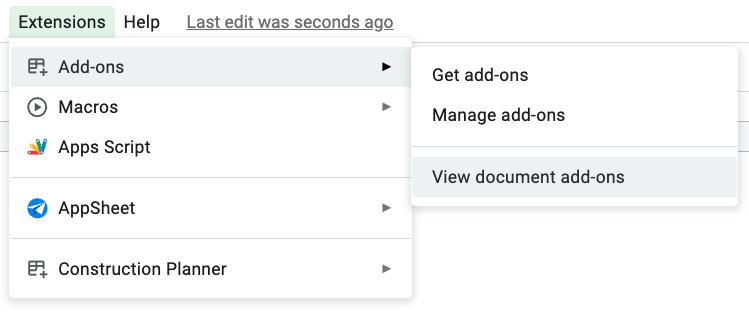
A side window will open from where you can click the “Use” button as shown below.